First code for the Button Pad Controller SPI
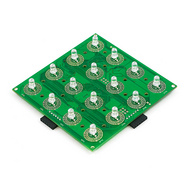
I recently got the Button Pad Controller SPI from SparkFun. Today I had some time to play around with the code, and got it working. Currently, it is only blinking all the lights, however the code should demonstrate the basics. The user guide from SparkFun documented the details of the interface. Add a few delayMicroseconds() calls, and it's up and running.
// The wires
#define CS 10
#define MISO 11
#define SCK  13

void setup() {
  Serial.begin(9600);
  Serial.println("setup");

  pinMode(CS, OUTPUT);
  pinMode(MISO, OUTPUT);
  pinMode(SCK, OUTPUT);

  digitalWrite(CS, LOW);
  delay(1);
}

int lights = 0;

void loop() {
  Serial.println("loop");

  // "The Button Pad Controller SPI will begin listening
  //  for a data set once the CS input has been brought high."

  // "(HINT: It's best if the SCK signal is set high before
  //  setting the CS pin high)."
  digitalWrite(SCK, HIGH);
  digitalWrite(CS, HIGH);
  delayMicroseconds(15);

  // Blink the lights.
  lights = !lights;

  // Four frames (3 for lights input, 1 for button output)
  // (Here, it is writing to output on the 4th as well, which
  // is wrong, but seems not to cause any issues).
  for(int f = 0; f < 4; f++) {

      // Each frame has 16 * 8 = 128 bits of data.
      for(int i = 0; i < 128; i++) {

          // "The data on the MISO line should be set while the
          //  clock is low. When the SCK signal goes high the
          //  Button Pad Controller locks in the data currently
          //  on the MISO line."
          digitalWrite(SCK, LOW);
          delayMicroseconds(5);

          digitalWrite(MISO, lights);
          delayMicroseconds(5);

          digitalWrite(SCK, HIGH);
          delayMicroseconds(10);
      }
  }

  digitalWrite(CS, LOW);

  Serial.println("end");

  // "The CS signal should remain high for the duration of the
  //  data set, at which point it should be brought low for a
  //  minimum of 400 μs before sending the next set of data."

  //delayMicroseconds(400);
  delay(500);
}